
티스토리 뷰
Converter란?
이전 글에서 정리했던 PropertyEditer가 가지고 있던 단점들 때문에 Converter가 생기게 되었다. Property 데이터 바인딩은 String에서 Object로의 데이터 바인딩이었지만, Converter는 A객체에서 B객체로 변환해야 하는 상황에서 사용할 수 있는 일반적인 상황에서 사용할 수 있는 변환기이다. 그리고 Stateless 하기 때문에 Thread Safe하다는 특징도 가지고 있다.
import org.springframework.core.convert.converter.Converter;

public class EventConverter {

    public static class StringToEventConverter implements Converter<String, Event> {
        @Override
        public Event convert(String source) {
            return new Event(Integer.parseInt(source));
        }
    }

    public static class EventToStringConverter implements Converter<Event, String> {
        @Override
        public String convert(Event source) {
            return source.getId().toString();
        }
    }
}
Converter<a, b> 인터페이스는 a에서 b로 타입을 변환하겠다는 의미이다. 그리고 convert()라는 메소드를 오버라이딩 해서 implements 하면 되기 때문에 구현은 간단하다. Converter는 Stateless 하기 때문에 빈으로 등록해서 사용하여도 상관 없다. 그러면 이제 어떻게 등록하여 사용해야 하는지에 대해 알아보자.
import org.springframework.format.FormatterRegistry;
import org.springframework.web.servlet.config.annotation.WebMvcConfigurer;

public class WebConfig implements WebMvcConfigurer {

    @Override
    public void addFormatters(FormatterRegistry registry) {
        registry.addConverter(new EventConverter.StringToEventConverter());
    }
}
위와 같이 WebConfig를 사용하여 WebMvcConfigurer 인터페이스를 implements 하여 addFormatters를 오버라이딩 해서 이 메소드에다가 등록을 해주면 된다. 이렇게 등록을 해주면 모든 Controller에서 동작하게 된다.
import org.springframework.web.bind.annotation.GetMapping;
import org.springframework.web.bind.annotation.PathVariable;
import org.springframework.web.bind.annotation.RestController;

@RestController
public class EventController {

    @GetMapping("/event/{event}")
    public String getEvent(@PathVariable Event event) {
        System.out.println(event);
        return event.getId().toString();
    }
}
따라서 위와 같이 코드가 작성되어 있고 event/1 이라는 요청이 들어왔을 때 StringToEventConverter 클래스가 작동을 해서 Event 타입의 형태로 Converter 시켜준다.
Formatter란?
Formatter는 Converter보다 웹 쪽에 특화되어 있는 인터페이스이다. 그리고 Formatter는 제네릭으로 한 개의 인자만을 받는다. 왜냐하면 Object와 String간의 변환을 담당하기 때문에 다른 하나의 인자는 String으로 정해져 있기 때문이다.
import org.springframework.format.Formatter;
import org.springframework.stereotype.Component;
import java.text.ParseException;
import java.util.Locale;

@Component
public class EventFormatter implements Formatter<Event> {

    @Override
    public Event parse(String text, Locale locale) throws ParseException {
        return new Event(Integer.parseInt(text));
    }

    @Override
    public String print(Event object, Locale locale) {
        return object.getId().toString();
    }
}
위와 같이 Formatter 인터페이스를 implements 해서 메소드를 오버라이딩 해서 구현하면 된다.
import org.springframework.format.FormatterRegistry;
import org.springframework.web.servlet.config.annotation.WebMvcConfigurer;

public class WebConfig implements WebMvcConfigurer {

    @Override
    public void addFormatters(FormatterRegistry registry) {
        registry.addFormatter(new EventFormatter());
    }
}
이번에는 addFormatter() 메소드를 이용해서 등록하면 된다.
ConversionService
이전에는 PropertyEditor를 사용할 때는 데이터 바인딩을 이용했다면 Converter와 Formatter를 사용할 때는 ConversionService을 이용한다. 위의 보이는 addFormatters() 메소드에 등록된 Converter와 Formatter들은 다 ConversionService에 등록되어 실제 변환하는 작업을 실행하게 된 것이다.(Thread Safe 하게 사용할 수 있음)
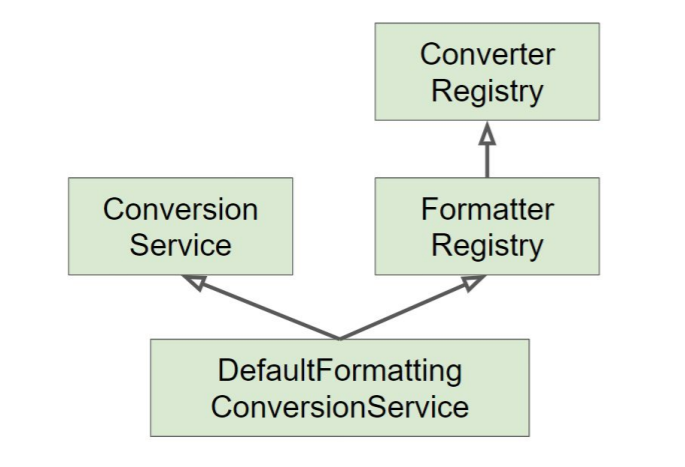
ConversionService를 구현한 클래스 중에 DefaultFormattingConversionService가 있고 빈으로도 자주 사용되는 클래스이다.
- FormatterRegistry
- ConversionService
DefaultFormattingConversionService가 위의 두 가지 인터페이스를 모두 구현했기 때문에 두 가지 기능을 모두 한다.
import org.springframework.beans.factory.annotation.Autowired;
import org.springframework.boot.ApplicationArguments;
import org.springframework.boot.ApplicationRunner;
import org.springframework.core.convert.ConversionService;
import org.springframework.stereotype.Component;

@Component
public class AppRunner implements ApplicationRunner {

    @Autowired
    ConversionService conversionService;

    @Override
    public void run(ApplicationArguments args) throws Exception {
        System.out.println(conversionService.getClass());
    }
}
코드를 위와 같이 작성하고 ConversionService에 어떤 클래스가 주입되는지 확인해보자.
class org.springframework.boot.autoconfigure.web.format.WebConversionServiceDefaultFormattingConversionService가 아니라 WebConversionService가 출력되는 것을 볼 수 있다. 이유가 무엇일까? WebConversionService는 스프링 부트에서 지원해주는 클래스이다.
public class WebConversionService extends DefaultFormattingConversionService위와 같이 DefaultFormattingConversionService를 상속받는 있는 클래스이다. 따라서 조금 더 많은 기능을 가지고 있다.
WebConversionService
스프링 부트가 제공하는 클래스인 WebConversionService는 Formatter와 Converter를 자동으로 등록해준다. 스프링 부트에서는 WebConfig와 같은 클래스 파일을 만들 필요가 없다는 말이다. Converter와 Formatter가 Bean으로 등록 되어 있다면 Converter와 Formatter를 자동으로 ConversionService에 자동으로 등록해준다.
import org.springframework.core.convert.converter.Converter;
import org.springframework.stereotype.Component;

public class EventConverter {

    @Component
    public static class StringToEventConverter implements Converter<String, Event> {
        @Override
        public Event convert(String source) {
            return new Event(Integer.parseInt(source));
        }
    }

    @Component
    public static class EventToStringConverter implements Converter<Event, String> {
        @Override
        public String convert(Event source) {
            return source.getId().toString();
        }
    }
}
위와 같이 @Component를 이용해서 Bean으로 등록한 후에 실행을 해서 localhost:8080/event/11으로 테스트 해보면 결과가 11로 잘 출력되는 것을 확인할 수 있다.
# 인프런 강의 (백기선 / 스프링 프레임워크 핵심 기술)
Resource 추상화 https://joinwithyou.tistory.com/34
Validation 추상화 https://joinwithyou.tistory.com/35
데이터 바인딩 추상화: PropertyEditor https://joinwithyou.tistory.com/36
데이터 바인딩 추상화: Converter와 Formatter https://joinwithyou.tistory.com/37
SpEL (스프링 Expression Language) https://joinwithyou.tistory.com/38
스프링 AOP: 개념 소개 https://joinwithyou.tistory.com/39
스프링 AOP: 프록시 기반 AOP https://joinwithyou.tistory.com/39
스프링 AOP: @AOP https://joinwithyou.tistory.com/39
Null-safety https://joinwithyou.tistory.com/39
# Reference
https://devlog-wjdrbs96.tistory.com/165?category=882236 (블로그)
https://www.inflearn.com/course/spring-framework_core (백기선 강의)
'Spring' 카테고리의 다른 글
| 스프링 AOP: 개념 소개 (0) | 2021.06.07 |
|---|---|
| SpEL (스프링 Expression Language) (0) | 2021.06.07 |
| 데이터 바인딩 추상화: PropertyEditor (0) | 2021.06.07 |
| [Spring] Validation 추상화 (0) | 2021.06.07 |
| [Spring] Resource 추상화 (0) | 2021.06.07 |